Knowledge Base
The Knowledge Base (KBase) is the shared library of rules and insights extracted across your projects — one home for the rules your team has validated and wants to reuse.
Rule sources
Rules reach the Knowledge Base from two directions, and you can browse either:
- Automatic Generated — rules produced by a model during a prediction run
- Expert Generated — rules a business expert built and validated in EEDA, then exported
Browsing rules
Open Knowledge Base and select a project.
- The rules list groups rules by their label, with a count per label.
- A negated part of a label is shown as a red NOT tag, so it reads clearly at a glance.
- Open a rule to see its IF / THEN breakdown: the conditions (the IF side) and the labels (the THEN side) appear as chips, with any negated chip carrying a visible NOT marker.
Use Back to labels to return to the list, and Change project to switch context.
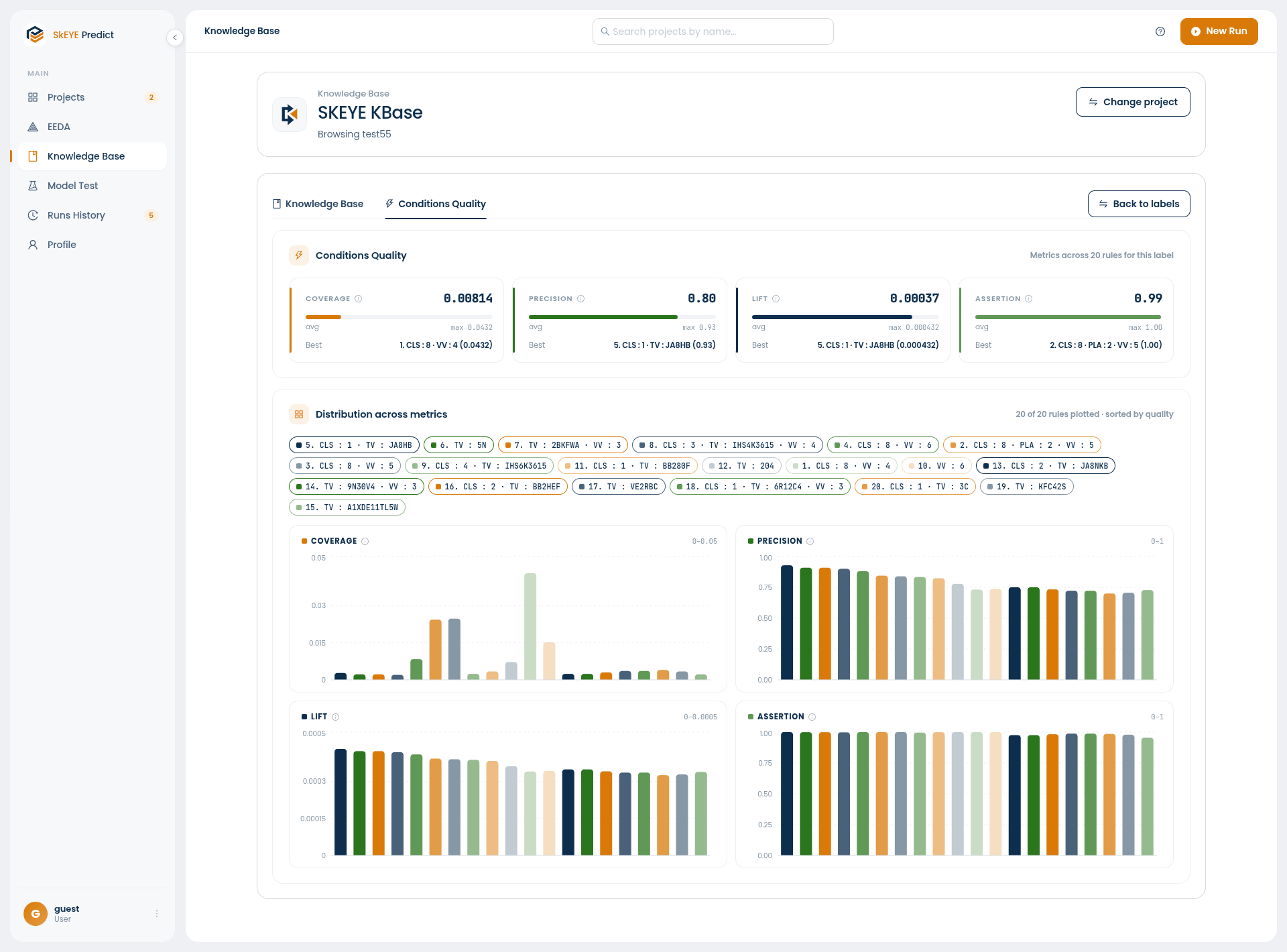
Conditions Quality
The Conditions Quality tab scores the rules held against a label, so you can judge the library rather than just read it. Four metrics are summarised — each with its average, its maximum, and the best rule that achieves it:
| Metric | What it tells you |
|---|---|
| Coverage | How much of the dataset the rule applies to |
| Precision | How often the rule is right when it fires |
| Lift | How much better the rule does than chance |
| Assertion | How strongly the rule asserts its conclusion |
Below the summary, Distribution across metrics plots every rule for that label across all four metrics, sorted by quality. Each rule appears as a chip you can click to toggle — or double-click to isolate — making it easy to compare a candidate rule against the rest of the library.
Looking for .pkl or .pmml files? Those are downloaded from the Model Explorer, on the
Explore Model step of a prediction run or from
Runs History — not from the Knowledge Base.