Modeling & indexes
This is where raw tables become something Skeyecube can answer instantly: connect the data, describe how it fits together in a model, then choose what to pre-compute.
Connecting a data source
From Studio > Source, load the tables you want to work with. Skeyecube can read tables from:
- A connected data warehouse (for example Hive)
- Any JDBC-compatible database
- A Kafka stream, for near-real-time streaming models
- Its own internal, managed tables, which you can create and populate directly through the built-in DDL editor
For a small table that's frequently joined against (a lookup table), you can take a snapshot — a cached, point-in-time copy — so joins against it don't have to hit the source system every time.
Building a model
A model describes how your tables relate and what can be queried:
- A fact table (the large table at the center, for example an events or transactions table) joined to one or more lookup tables (smaller reference tables, for example customers or products)
- Dimensions — the columns you'll group or filter by (region, product category, date, …)
- Measures — the aggregated values you'll compute (
SUM,COUNT,COUNT_DISTINCT,MIN/MAX,TOP_N,PERCENTILE_APPROX, …) - Optional computed columns — derived expressions (for example
price * quantity) that behave like a regular column in the model - An optional partition column (typically a date) so data can be loaded and rebuilt incrementally, one segment at a time, instead of reloading everything
Build the model visually in Model, dragging tables onto the canvas and drawing the joins between them.
Models and cubes
The Model area lists every model in the project alongside the cubes built from them. For each cube you can see:
- Its status —
READYonce it has been built and can answer queries - The project it belongs to and its owner
- Cube size and the number of source records it was built from
- Last build time, so you can tell how fresh the pre-computed data is
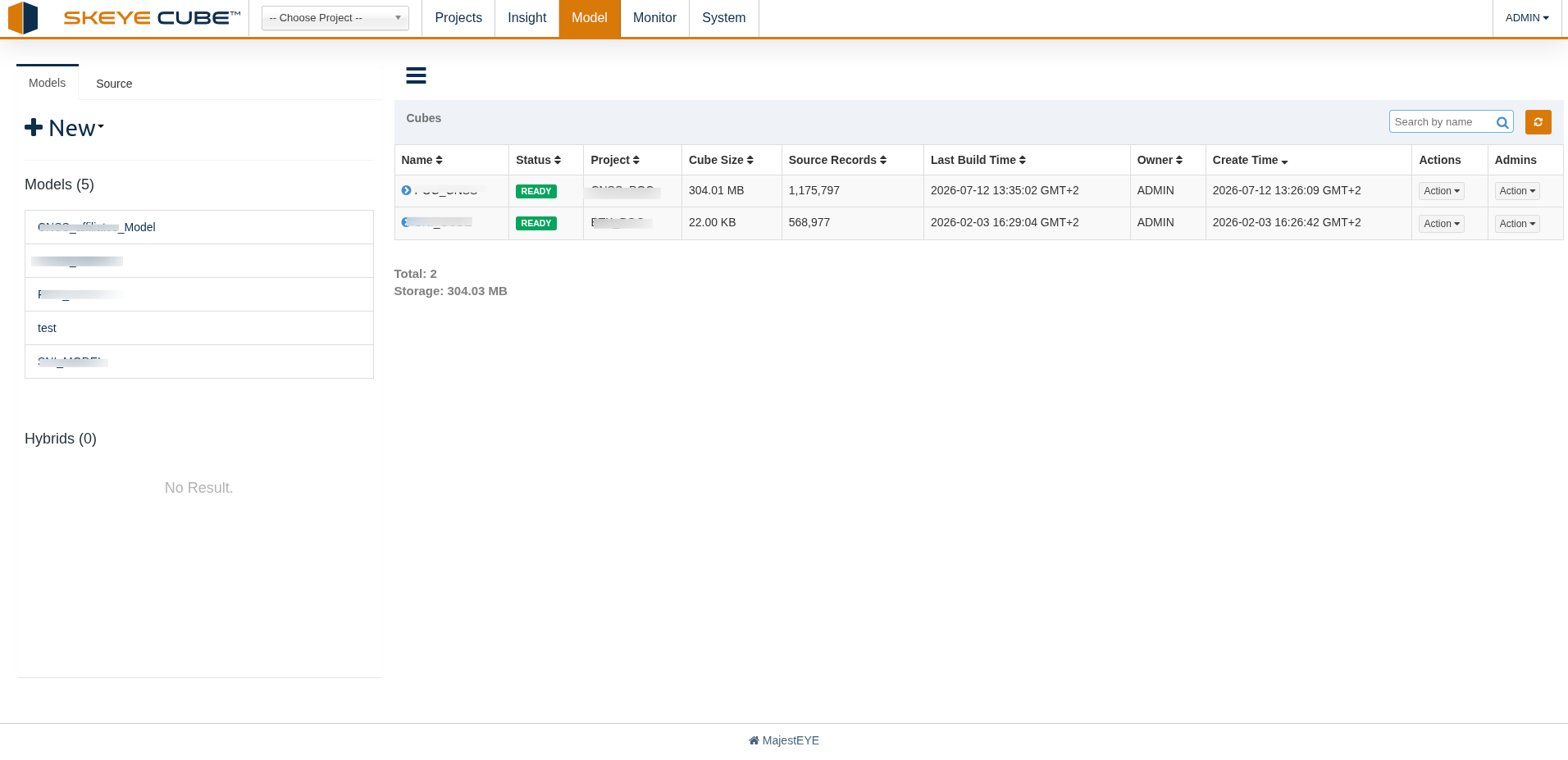
The totals at the bottom show how many cubes exist and how much storage they occupy — useful when deciding whether a rarely used cube is worth keeping.
Choosing what to pre-compute: indexes
A model on its own doesn't speed anything up — it just describes what's queryable. Indexes are what get pre-computed:
| Index type | Use it for |
|---|---|
| Aggregate index | Pre-computing combinations of dimensions and measures, grouped into aggregation groups, so common GROUP BY queries return instantly |
| Table index | Pre-sorted, detail-level (non-aggregated) data, for point lookups or exporting raw rows fast |
You don't have to design every index by hand — Skeyecube can analyze your query history and recommend models and indexes that would speed up the query patterns it's actually seeing. Review proposed recommendations and accept the ones you want built.
Building segments
Saving an index doesn't build it immediately — it queues a job that computes the data for each segment (an incremental slice of the model's data, such as one day, if you've set a partition column). Track build progress from Monitor > Job; once a segment finishes building, queries that match its index start being answered from it instead of the raw source.