Projects & data sources
Jeyeda lets you manage several data-quality projects, each covering its own scope of data and use cases. This keeps quality work organized as it scales across teams and domains.
Manage projects
From Projects Management you can create and manage your data-quality projects. Each project shows its configured rules, grouped by quality dimension, so you can see coverage at a glance.
To create a project:
- Open Add New Project.
- Give the project a name.
- Select the data source it will work against.
The team typically starts by creating a new project, then connects the data sources relevant to that scope.
Connect data sources
From Data Sources you add and manage the connections used by your projects. When adding a connection you provide:
- Connection name
- Database type — for example MySQL, PostgreSQL, or Oracle
- Host, database name, username, and password
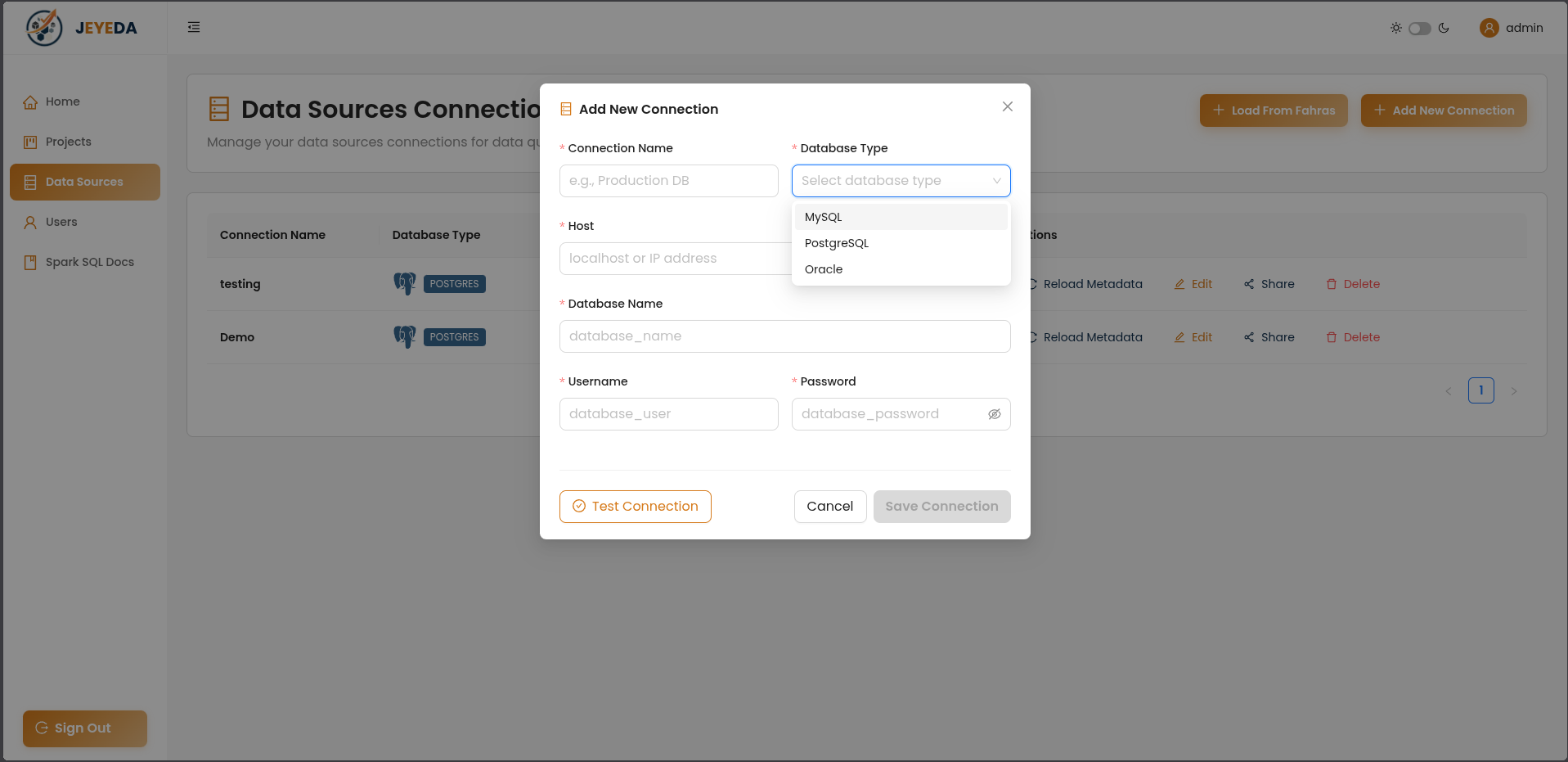
Use Test Connection to validate the settings before saving. A single project can manage multiple sources, so you can measure quality across everything in its scope.
Instead of entering a connection by hand, use Load From Fahras to reuse a source already inventoried in your Fahras catalog — so the catalog and your quality projects stay aligned.
Existing connections can be edited, shared, or deleted, and Reload Metadata refreshes a source's structure after it changes.
With sources connected, you're ready to define quality rules.